Nov 23 2014

Imgur Image Scraper v1

Much like the title says.

Version 1 of this application, use it as you wish however it will take any imgur album url and download all the images to your local “My Pictures” folder.

Personally this is useful as a platform on forums, news and entertainment sites. Works perfectly with all URL’s on reddit.

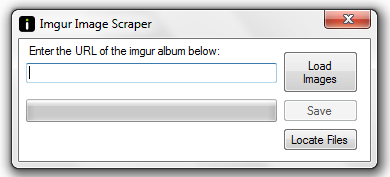
The form is fairly simple and easy to use:

Imgur Image Scraper

Download link as below:

Click Here to Download


Dec 15 2011

How to Prevent Windows from Force Updating [1215]

So as usual this posting relates closely to another post I made, but this is slightly more important as this relates to the message we all get after installing updates where windows basically forcefully makes us restart our computer. Usually this annoying little message will appear when we are in the middle of ten million things that are going on around about us and have an urgent requirement to actually get a specific task done. We have all been there…..


Now this message is all ok most of the time, apart from when windows decides enough is enough and gives us 5 minutes before it automatically shuts itself down. Now there are ways to stop it and remove this type of behaviour, however the prompt will still appear. But the good part is that the functionality to completely shut down the machine automatically will be removed.


As far as I am aware this trick will work in all versions of windows.


The modification itself is pretty straightforward, we are relying again on basic user ability to be able to use regedit.


First step is to launch regedit and you will want to navigate to the following key entry:


HKEY_LOCAL_MACHINE\SOFTWARE\Policies\Microsoft\Windows\WindowsUpdate\AU


Then inside this location you will need to create a new 32-bit DWORD and name it NoAutoRebootWithLoggedOnUsers and give it a value of 1. This will prevent any type of automatic reboot scripts running while any users are logged in.

Obviously removing this custom variable will put things back to the way they were before, but going on the fact you want to remove the functionality I doubt that will happen any time soon.


All that is left to do is reboot your machine, and that’s it – all the changes will have taken place during the reboot and your computer should now no longer automatically reboot, especially when you don’t want it to – happy days!!


Dec 6 2011

Possible eMMC fix [1206]

I know that a previous post of mine talks about the infamous eMMC problem where the chip will burn out, however looking over some of my notes on eMMC chip problems I did come across a couple of things I noted in regards to possibly finding a solution to a couple of the issues.


Now the usual way we know we have an eMMC problem is that we get:


E:Can’t mount /cache/recovery/command

E:Can’t mount /cache/recovery/log

E:Can’t open /cache/recovery/log

E:Can’t mount /cache/recovery/last_log

E:Can’t open /cache/recovery/last_log


appearing as a debug message, this is actually the full “cache” partition being corrupted. Obviously the majority of rom chefs have run into this problem many times and myself included I have seen that message on more than one occasion over different handsets.


Usually there isn’t a fix for any error like that, once the cache partition is corrupted you really cannot recover from that, it is a catastrophic failure. The only way I have been able to fix this a couple of times and that was by immediately removing the battery and letting it sit for a couple of minutes before putting the battery back in.

Then if you boot directly into the boot loader and hit into recovery mode.

Now if you haven’t received any major errors you cahce partition should now be formatted as ext3, so if you cycle through the menus and format it to ext4.

Do a full wipe of everything, including factory reset, davlik cache and battery stats

Flash the rom of your choice again (now make sure it is the correct rom for the phone) and hope for the best that it works.


Now hopefully that potentially can resolve your problems, if not then you will probably have a serious eMMC problem and potentially will have bricked your phone.


I will say this method has worked 9 out of 10 times with me and I still have these notes saved for the next time it occurs.


Key things to remember, always track changes in the rom – see if there is a good user base and check them against other more popular roms to see the differences and benefits if there are any.


Dec 5 2011

HTC Desire S Grip of Death [1105]

There has been a lot of talk more recently that the HTC Desire S actually suffers from the major problem that the iPhone 4 had which was the Death Grip where your signal would completely drop out when you held your phone normally. I can confirm that this is partially correct – there is a lot of speculation as to what the actual problem is. I seem to see it more when you are connected to a wi-fi point where the signal will drop around 20 dbm when you move your hand across the phone. There are reports that this is also the same for the likes of your 3G & H band signals but it seems that the user case is different each time.


The major problem is that no one problem is the same. Some people are experiencing problems with wi-fi signals some with their GSM radio signal – the best thing to do is to monitor your findings over a long period of time, a couple of weeks to be exact so that you can see a patern and then decide on the best course of action. You will also probably be looking to install a wi-fi signal monitor that will accurately tell you the signal strength so that you can measure it at different times and with the phone in different positions. Once you find a pattern (if there is one) next you will need to do a little bit of research see if anyone running the same software as you with the same radio and model has the same problem. A lot of people seem to think it is a software problem which will lie in the radio updates, where as other think it is actually a design flaw in the phone. Especially since the main antenna is in your battery cover (little gold contacts – check them out).


To solve the issue is really up to yourself, there are some serious problems in identifying where the actual problem lies and you will need to do some serious research in to try and find out a solution for your problem. My gut instinct is telling me to solve the issue you will need to fully update all the software the phone is running, OS and radio. This at least  gets rid of one of the variables and leaves you with the hardware issue itself.


This fault has been reported on both stock and modified ROMS so be careful what you choose to flash and for the love of god make sure you flash the correct rom/radio for your specific phone. I will not be held accountable for silly mistakes you make like that – you have been warned!!


Dec 4 2011

GPS issues [1204]

Of all the custom built ROMs I have used, on a majority of Android built phones I have noticed one common element/problem. They all seem to have specific problems when attempting the GPS fix and this is with the already downloaded AGPS data. Now the problem lies within one file within the final build of the cooked roms, probably a very important file that is used when creating the satellite fix. The file in question is the gps.conf file which lies within the main OS, luckily it can be changed.


Now the reason the file needs changing is because the majority of custom roms (especially non-sense roms) are keyed with the incorrect NTP server set. So the solution is quite simple, yet you still need to be an advanced user obviously.


Firstly get over to http://www.pool.ntp.org/en/ and find the most active server closest to your area.

Make sure you have a file manager installed on your phone which will allow you to edit specific files.

Navigate the file manager to /system/etc/gps.conf – Edit this file and change the NTP server to the one that you found was the closest in your area.

Save the changes you have made to the file.

Reboot your phone.


Now your phone should pick up the config when it boots, but what you can do to assist it is to reset the AGPS data that would have been downloaded previously. To do this you will need to download an app from the market place. It is free and the one I have used quite a lot is a tool called “GPS Status & Toolbox”. Once downloaded if you go into tools then manage a-gps. If you hit reset and then again fo into tools and manage a-gps, then hit download.

This will refresh the assisted GPS data that your phone/device is supposed to download automatically when “trying” to make a gps fix.


Hopefully that will help kick start the GPS and it should be a lot more responsive in getting a fix. Key point here is to remember to reboot otherwise no changes will take place!!


Dec 3 2011

Flashing Custom ROMS in the recovery [1203]

Everyone wants to run custom built roms on their phone – well any smart person does anyway! Custom built roms usually have added features like over clocking, memory management and less bloat ware than what is installed as standard.


Firstly to be able to flash your phone with a custom rom build you will need to find one. You will need to do some research on this one. You will need to find out what is compatible with your phone and also have an idea of what you want to achieve by making the changes.


Once you have your rom, and download it to your desktop you will need to rename it to “update.zip”. Next you will need to put the update.zip file onto the root directory of your SD card.


Turn your phone off and then boot your phone into recovery mode (fastboot needs to be disabled)


You will need to perform a full wipe/format and clear all the caches. These options are under the wipe option in the recovery menu.


Next choose “install from sdcard/zip file” and then choose the “update.zip” option from the menu.


Once the flash process if competed all you need to do is reboot the phone. The phone will take about 10-15 minutes to boot up after a new flash and once that is done you will need to set up your accounts again and that’s it.


Dec 2 2011

Androids Radio Interface Layer [1202]

When you first buy your android phone (and most probably every other phone) it will run a “radio Interface Layer” usually between the Android OS and the Radio device itself. This way they can communicate between each other so that the main functions of the phone can actually work.


However in some cases, and if you live a little bit on the edge then you may want to update this image with a more new up to date one. People frequently do this to avoid signal drop outs that happen to them or just general mobile phone signal problems. Majority of time these fixes are released in the next OTA update however if you are running custom builds you obviously won’t be able to get the OTA updates.


Now just to mark this with a disclaimer. If you actually geographically have signal problems then this will not fix them. This fix should only be performed if there is an up to date radio for your device and also if you are experiencing signal drop outs where you know there shouldn’t be. I will not be held liable for anything you follow out of this guide, you can brick your phone by incorrectly flashing the wrong radio. Make sure you are aware of the consequences if you do something wrong and that you know what you are going before you go any further.


  1. Download the updated radio zip image
  2. Place the downloaded file onto your microSD card and rename it PG88IMG.zip
  3. Reboot your phone into the HBOOT menu (fastboots needs to be disabled)
  4. Once in HBOOT you will be prompted if you want to flash the new image to the phone – select yes
  5. After the process if complete you should just need to reboot your device and that’s it


Once your phone has booted (if you carried out the steps correctly) you should have a new radio image working on your phone. Once it has booted and everything is working, you will need to remove the image file from your microSD card so that it doesn’t keep trying to flash the image on every boot.


Dec 1 2011

Nandroid Backups [1201]

Nandroid backups are a fairly simple solution allowing you to avoid loosing all the data on your phone. A nandroid backup is a specific backup type which stores a “full image” of the phone on your memory card allowing you to restore this image at a later date if required.


Now you will require a rooted phone and a custom recovery flashed to your boot for this to be able to work – however I somewhat anticipate that you already have this if you are looking at this article.

You will obviously also require that you have a memory card to store your backup image on – a full backup can range completely in size. It really all depends what you have on the phone.


If you have all of the above then the process of creation and restoration is reasonably straight forward.


Firstly you will want to boot the phone into the recovery menu, and navigate to the backup/restore section in the menu.

If you enter into that section you should be presented with a range of choices, usually somewhat along the lines of:


  • Nand Backup
  • Nand + Ext Backup
  • Nand Restore
  • Bart Backup
  • Bart Restore

The option you are looking for is “Nand Backup” (or “Nand Ext Backup” if you have a partitioned SD Card).  Confirm this selection and the task should begin.

The backup should take around 5 minutes to fully complete – but again this completely depends on how many apps and how much data you have on the phone.

Once it is finished you will have a full Nandroid backup on your memory card to be able to restore if needed.


Restoring the backup is much the same as the process above with a couple extra points.


Firstly you are going to need to boot into the recovery menu, however you will need to do a wipe on the phone/device. So you will need to select the wipe menu, and then “Wipe Data/Factory Reset” and also the “wipe Dalvik-Cache”. Doing this just clears the phone of any software problems that could be replicated onto the backup when you restore it.


Next you will need to go into the backup/restore menu and select nand restore. Once selected you will need to select the Device ID which should begin with a “HT”. This ensures that you are restoring the correct backup on the correct device.


Select your most recent backup that should be on screen and that’s that. You will probably have to wait at least 5 minutes on newer phones probably longer on older android phones untill the full restore has been done.


It will show as completed on screen when done and all you need to do after that is hit reboot and your device/phone should be back in working order the exact same as when you made the backup.


One tip I will give you and that is that if you are performing regular backups, clear your legacy backups or move them onto an additional storage device. You will also most probably want to store your most recent backup on another storage device as well incase your phone is stolen or lost. This way you can put it back to the way it was before everything was lost.


Nov 30 2011

Faster Browsing on Ubuntu [1130]

One of the best things with Ubuntu or any flavour of Linux is that you can basically make it do whatever you want it to as long as you put the time and effort in. There was a recurring argument a couple of years ago between myself and a close friend regarding running a Squid cache server on a clients linux server. I had always argued that you know running a centralised Squid server is really dependent on a lot of traffic going through it on a regular basis to build up the cache reserve to make it a useful investment.


However it didn’t matter how much I argued it was never changed, and we just had to put up with it. On a couple occasions I have seen a Squid server slow down the browsing speed on local machines however I have now tested this rigorously on a server within my own personal network to see if it is a worthwhile investment of time and what I found out was that yes for a larger scale distribution this works. You have a lot more traffic going through the server for the Squid system to capture and therefore a much greater amount of data that can be used for calls after the capture time.


Now what I did find out is that instead of caching the pages you access, why not just reduce the resolution time and therefore cut down on at least one of the lengthy time variables it takes to launch a page in your own browser.


To be able to do this on Linux you will need to get dnsmasq installed.


  • sudo apt-get install dnsmasq


Then you will need to configure dnsmasq correctly. The most easiest way to do this will be using the terminal and your favourite editor. My command would look something like this:


  • sudo nano /etc/dnsmasq.conf


You will then need to find the line which says “#listen-address=”. You will need to remove the ‘#’ and add “127.0.0.1” after the ‘=’ to set this variable up correctly. Now make sure you save the changes and exit from the editor you have been using.


Now that that is done you will want to open up the dhclient.conf file “sudo nano /etc/dhcp3/dhclient.conf and add in the line “prepend domain-name-servers 127.0.0.1;” to the file to make your other changes work.


Next is the changes to your resolv.conf file which you may need to change and you will need to add in an additional line at the top of the file. This line should be nameserver 127.0.0.1, after you have added this line in you will need to save the file and exit out of your editor again.


After doing this you will need to restart two services, firstly restart your networking and after that restart dnsmasq to put the new config into use.


After you have done this you should have a nice little dnsmasq setup on your own computer caching the name queries removing the time it takes to resolve the name. You should be able to notice a different in which the pages load however please note that this does not “speed up your connection”, your connection, download and upload will all be the same. Just the method in which the pages are resolved.


As for seeing that this works, you can quickly test this in the terminal by “digging” a domain and after the initial time you do the request. Further ones should show a “Query Time” of 0ms.


Nov 29 2011

Volume Button Mod [1129]

Ok so we all do it because its the only way we really wake up our HTC phones. Pressing the power button will make an interrupt to wake up the phone and take it out of sleep mode. Now the only problem is that the power button can become over-used and can become broken over time.


So why allow the use of the volume button to wake up the phone as well? Well from stock this option is not given, however – this can be modified and pretty simply.


Firstly you will want to find a file within your build called “android.policy.jar”  called KeyguardViewMediator.smali and you will want to open it with the notepad or something similar.


Once opened you will need the line with ” .method private isWakeKeyWhenKeyGuardShowing(I)Z” and delete the 0x18 &0x19 lines.


Save your edited file and repackage your build.


Once built flash onto your device and hopefully you should now have a phone that can be woken by using the volume buttons as well as the power buttons!


Happy modding!!